

Archive

Posts Tagged ‘bounce rate’
Adam Lapp

Online Marketing Tricks vs. Testing: The Thrilla on Mozilla

Adam Lapp May 14th, 2010

Editor’s Note: Research Manager Adam Lapp is reviewing the battle between common Internet marketing practices to help you determine which optimization strategies are most effective and give you ideas for new tests. On Monday, we published Part 1 in this series. On Wednesday, Part 2. Well get ready fight fans, hold on tight to your Mozilla Firefox, Apple Safari, or Google Chrome browser, because here comes Part 3…

Heat Map vs. Data Analysis

Breakdown:

When Heat Map enters the ring, he’s very intimidating, and looks great on the surface. He always shows up in a flashy, beautiful silk robe and has crazy music playing when he enters. Heat Map was a wizard at getting attention and he values the things that give him attention the most. He points to the camera flashes and banners and professes his love with a big red kiss.

All of Heat Map’s theatrics are fine. It’s part of the show. However, he gets himself into trouble by making outlandish conclusions about his opponents, like being able to know exactly what punch his opponent would land just by looking at the color of his clothes. Many times when Heat Map thinks someone will punch him in the rib cage, they instead throw a cross to his temple.

For his fight against Data Analysis, he trained mercilessly in the gym – lifting weights, doing crunches, and hitting punching bags. When it came time to fight, he strolled into the ring confident that his opponent’s strength was the left hook. Why? Well because he saw a red and yellow tattoo of a python on his left bicep.

Too bad he didn’t actually watch footage of Data Analysis’s previous fights. If he had, Heat Map would have known that most of his punches come from the right. What a shame to see him knocked out in a matter of seconds.

Sometimes Heat Map is right about his opponent though. Sometimes the key to victory is written on one’s sleeve. But it’s very, very dangerous to rely on just “sometimes.”

Data Analysis on the other hand is subdued and quiet. A stark contrast to Heat Map. But under that calm exterior is a supreme confidence because, unlike Heat Map, he has been studying his opponent’s film for hours. He’s learned that Heat Map throws himself a little off balance every time he attempts a left hook. He knows that Heat Map doesn’t bob and weave, but instead focuses his attention on one thing…in this case it’s the tattoo of the python.

Bottom Line: Data Analysis has been training hard, bringing in numerous sparring partners who fight like Heat Map. He uses his insights from these exercises to model what fight techniques he thinks Heat Map may try…predictive modeling. From the film studies, he performs a regression analysis to determine the relationship between Heat Map’s jabs and his upper cuts. He figures out a correlation between the two – every time Heat Map throws two jabs in a row there is a high probability for an upper cut to follow.

The fight starts, and Heat Map is looking good, fancy footwork, doing a great job dodging that left hook. But 1:19 into the first round, he goes for the double jab and Data Analysis clocks him. He had been waiting for that the whole time. KO in the first round. Most of the time Heat Map is a solid bet, but any smart gambler will always look past the impressive exterior to see if his head is really in the fight.

ADAM LAPP’S UNOFFICIAL SCORECARD:

Heat Map – 4

Data Analysis – 9

Bounce Rate vs. Conversion

Breakdown: This is a very unorthodox fight, and I don’t know how the promoters sold this one. Boxing commissions from several countries turned it down, and eventually they had to film it for the Internet from an undisclosed location.

Bounce Rate is just a cruiserweight fighter. Sure, he’s a good boxer and everyone knows who he is.  His technique is all about speed. It’s about unleashing the first jab in a split second. But Bounce Rate’s fight record has more losses on it that wins. For such a quick fighter, a throwback to Sugar Ray Lewis, it’s difficult to understand why he doesn’t receive more favorable decisions.

So it’s strange that a heavyweight is on his radar. Each time a referee raises the hand of Conversion, somebody has a serious payday. But Conversion hasn’t accomplished everything on his own. He relies on a whole team to prepare him for a fight: Clarity of Value, The Friction Reducer, and The Anxiety Mitigator.

Unlike the team behind Conversion, Bounce Rate’s trains alone and his preparation is usually focused on one punch, one quick hit. That quick hit can be very effective, but after that’s thrown, Bounce Rate relies strictly on improvisation hoping that the momentum of the first punch leads to a decision. Sure that first jab is important and Bounce Rate should do everything possible to land it, but he’s focused entirely too much on a short-term goal, on a secondary objective.

The fight began predictably. Bounce Rate unleashed his first jab in a hurry and the crowd cheered. “Success” they chanted repeatedly! For the first few rounds, Bounce Rate went wild flinging himself all over the ring. Conversion couldn’t touch him. It seemed certain that he was ahead on the scorecard, but when the numbers came in, Bounce Rate’s success had no impact on Conversion.

Bottom Line: In the next few rounds, Conversion began executing his fight plan. He threw fewer punches than Bounce Rate, but they were much more quality shots. He still had not captured the crowd’s favor. For six rounds they stubbornly championed the smaller Bounce Rate. Conversion knew he was the better fighter, but there was only one way to sway the crowd…RESULTS.

All of a sudden, Conversion caught Bounce Rate with a cross and down he went. One, two, three…As Bounce Rate was down, Referee ROI just stood there. Four, five, six…still down and ROI did not move.  Seven, eight, nine, ten…Knock out! Referee ROI grabbed Conversion’s glove and raised his arm in the air.

ADAM LAPP’S UNOFFICIAL SCORECARD:

Focus on what matters. All you need to know is that conversion won by KO.

Tricks vs. Testing

I hope you’ve enjoyed this three-part “boxing” series where we’ve pitted the latest and greatest tricks against proven principles that have come from Testing. Whether it’s a Flash Banner or an Above-the-Fold page, the important thing to remember is to test instead of implementing blindly based on someone’s “can’t miss” recommendation. Because while these proven principles have been very successful for our Research Partners, unless you test them yourself and discover what really works for you, they are no better than tricks.

And over the last ten years, we’ve seen a lot of Tricks come and go. Some have worked and some haven’t, especially in the short term. But without Testing, it’s impossible to understand why a Trick was successful or why it wasn’t.

Because Tricks are popular for a reason. They can be wildly successful…for “some” businesses. The primary question is, can they be successful for your business. And that’s why Testing gets the TKO against Tricks. Testing gives you the business intelligence to discover what really works, right now, for your company.

That’s why, at the end of the day, Testing will always defeat Tricks. But I’ll drop the fight analogy right now, because the two can work together. This is not a zero sum game. Whenever you hear somebody tell you to “Try this trick” or “Implement this tactic,” apply scrutiny and determine for yourself if you think it can work for your business or not. If it has a chance, give it a shot. But test it against what you know already works to see if it works better. Or not. In this way, you will continually improve your marketing performance.

Related Resources

Tricks vs. Testing: The Battle for Internet Supremacy

Flash Banner vs. Headline, Lead Quantity vs. Lead Quality: The fight for online marketing ROI continues

Face Your Fears: Why visitors really bounce from your site, part 3

Analytics & Testing

Corey Trent

Face Your Fears: Why visitors really bounce from your site, part 3

Corey Trent November 25th, 2009

In Part 2 of our series on bounce rates, we examined how to ensure consistency between your site and the links and ads that drive users there. But once they understand the connection between where they came from and where they are, is there a clear path for what they need to do next?

Sometimes we get so caught up in creating great-looking pages, killer headlines, and excellent copy that we neglect making sure there is a clearly understood goal for what the user needs to do next. It is our job to make the next step in the flow logical and clear so we help them make the intended decision.

Some people arrive at pages and find everything attractive and desirable but there is no clear next step, so they leave. Think of it as having a great infomercial about a knife set. After watching for a few minutes, I’m convinced I need knife that can cut pennies. To top it off, if I act now I can receive a second knife for free. Score, I’m in! However, the infomercial ends there. No phone number or website. I’m excited, I want these amazing knives, but don’t know what to do next. Due diligence with graphics, copy, headlines and other aspects of web pages accomplishes nothing if you are leaving your visitors hanging.

Every marketer I’ve worked with thinks this is pretty basic and they’re doing it already. If you’re nodding your head in agreement, here is my Thanksgiving challenge to you. After the turkey has been devoured, let Uncle Saul and your niece with the pink hair sit down and try to navigate your pages. The results, and their hang-ups, might surprise you.

Now, to address a couple of excellent questions I received about the first two posts in this series…

How do I look at bounce rate for specific blog post pages that have descriptive links that direct traffic directly to the post? – @SquidleyRidley

On social media and other channels, there are many links to single posts on a blog. For example, tweets with a link to a blog post. This can cause, as Squid points out (can I call you Squid?), a situation where people might be more likely to bounce because of the very targeted nature of the visit.

However, as markers and content managers, it is our job to create an engaging experience. A good related post section at the end of each post, and perhaps in the navigation as well, can greatly improve engagement. Here is an example from GetElastic, a blog by Linda Bustos. Note how she engages users with related links at the end of her blog posts:

Like This Article?

Just installing a plug-in to generate these related post links might return poor results, so this may require some manual work on your end. Automated systems have come a long way, but sometimes a human mind is needed in building a useful list.

Google is the most fantastic software on the planet. How else can we use Google Analytics to arrive at more intelligent bounce rate reporting? – Sergey, Larry and Eric

For the sake of space, I edited several questions I commonly hear about metrics into the above question and attributed it to three random people from Mountain View, California.

Avinash Kaushik and other metrics evangelists believe that a true measure of bounce rate is not the relationship with navigation, but rather time. While the exact number is different depending on the source, most believe that after a visitor is on the site longer than six to ten seconds they are no longer a bounce even if they never click to another page.

According to the Padicode blog, you can use event tracking in Google Analytics to generate a report that shows visitors that stay for less than ten seconds (or whatever time period you designate). The following code line should be added under the pageTracker._trackPageview(); line:

setTimeout(’pageTracker._trackEvent(\’NoBounce\’, \’NoBounce\’, \’Over 10 seconds\’)',10000);

In the code, please note the 10000. This number is in milliseconds, so it equals ten seconds. Your report now shows an appended bounce rate of users that meet these criteria. This is not retroactive, so data will take a while.

Google Analytics Dashboard

Corey, you speak in generalities. We want something specific. What number should we be looking for? – Sergey, Larry, and Eric

It depends.

Thanks for reading this series on bounce rates. I hope all my American readers have a great Thanksgiving, and readers in the rest of the world enjoy a fantastic Thursday.

OK, I’m back. I can’t leave you hanging like that. I know you want a number, but I just can’t give it to you. I received many questions about this (and thanks to Sergey, Larry, and Eric for serving as a concrete representation of all those questioners), but there is no one right answer.

For certain pages/process, you have a tighter leash on traffic and should have a lower bounce rate than others. For example, homepages receive traffic from a vast array of sources, thus something in the 40-60% range would be acceptable. If you are using the above analytics tip and are thus measuring time spent, a much lower bounce rate should be the threshold.

For PPC landing pages, that number should be lower – in the 30-40% range. And ideally lower than that if you have a tight rein on your keywords and a healthy account structure with negative keywords. Again, if you’re using the above altered bounce rate reporting to measure time spent, even lower numbers should be expected.

Now that I’ve got you excited about bounce rates…

There is a point of diminishing returns with bounce rate, as there is with focusing too much on any one metric. In an attempt to squeeze incremental bounce rate improvements, you have to ask if your time spent is better spent elsewhere. For example, improving your product or offer, formulating strategic partnerships, observing changes in your competitive landscape, and so on. It is very easy to become a tad obsessive (I am currently recovering and a member of Web Analytics Anonymous as well) and we end up robbing precious brainpower that we can devote to other items.

I hope this three-part series on bounce rates proved useful and helps you gain a greater return from your pages. Make sure you perform due diligence to accurately measure bounce rates, understand why bounces happen, and test to lower that number by providing more engaging pages/process. Then let things cool for a bit and return at a later time with a fresh set of eyes.

What metric would you like us to address next? Leave a comment below about your measurement challenges and we will try to address them on future blog posts or in upcoming web clinics.

Analytics & Testing, Internet Marketing Strategy

Corey Trent

Face Your Fears: Why visitors really bounce from your site, part 2

Corey Trent November 23rd, 2009

In Part 1 of our series on bounce rates, we explored how to drill down into your metrics to find the numbers that really matter. But that left us with an unsettling question. For the users that do bounce but shouldn’t…what is missing that would pull them into your site?

Look at where your traffic is coming from and where it is landing
Many people think that a high bounce rate means there is a problem strictly with the content on the page. While that can be the case in part, you should take a step back and look at where people are coming from and the messages they see before arriving to your site to fully diagnosis a high bounce rate. For example, let’s look at the following user interaction…I’ll be the guinea pig.

I’m thinking of buying a new turbocharger for the Subaru WRX I race on the weekends. So I search for turbochargers.

Google Search "turbochargers"

Then I click on a PPC ad that mentions the following items:

  • Unbeatable prices
  • Turbochargers in stock
  • Free shipping

I think to myself, “Great! This is exactly that I am looking for.” I initiate a click and this is the page I am greeted with:

Xtreme PSI

Where is free shipping?
Where are the in-stock items?

And most importantly… WHERE ARE THE TURBOCHARGERS?!

If you just looked at the content of the site in a vacuum, you would find it acceptable. But users being directed to this site from that PPC ad have expectations that this page isn’t fulfilling.

I have seen many people in this situation look at their site metrics and when they see the high-bounce rate, just keep radically changing the page without any real regard to the user’s thought sequence. They get frustrated when the page continues to underperform.

And remember, I am just using my quest to break the local time trial record in my tuned-up WRX as an example. These principles do not only apply to landing pages or companies running paid traffic.

Text links (on other sites directing traffic to your pages), emails, and newsletters set just as much expectation as paid search banners. For external links, use a research tool like Yahoo Site Explorer to investigate the links to your pages along with the messages being communicated. Then evaluate if your page connects with those messages (If you’re uncomfortable with how your page is presented, contact the owner of the page to edit the links. You will be surprised how willing people are to make those edits if you ask nicely.)

Of course, giving customers the information they need is only the beginning. If we really want to address the bounce rates of key segments we are concerned about, we must get them to act…

On Wednesday, Part 3 will examine how you get visitors to act by giving them a clear path for what to do next.

Have additional questions? Other metrics you’d like to look at? Use the comments section below or shoot me a tweet me at: @ctrentmarketing

Analytics & Testing, Internet Marketing Strategy, Paid Search Marketing (PPC), Research Topics

Corey Trent

Face Your Fears: Why visitors really bounce from your site, part 1

Corey Trent November 20th, 2009

FearfulBounce rate is the metric that makes many marketers wake up in a cold sweat. Many Research Partners are consumed (dare I say haunted?) by this metric.

I don’t want to water down the power of bounce rates. But as with most metrics, it isn’t as simple as following a rule of thumb like “keep the number of bounces low.”

So in this series of posts, I’ll take a closer look at what your bounce rates are really telling you… and what is just an imaginary monster under the bed. Let’s look past the anxiety and hone in on what we can learn from these numbers. And, perhaps in the process, help you sleep a little better at night.

Analyze the action that a “typical” user will take on your page

Why does the visitor come to your site and what are they planning on doing there? Answering this question can help you determine if they’re leaving because the site isn’t delivering on some level, or if they simply got what they were looking for and moved on. To show you an example of what I’m talking about, let’s take a look at what may be happening on your blog.

I hear marketers worry about blog bounce rates quite often, so let’s think about how a typical reader views one. You probably post the most recent information right at the top where it is easily accessible – quite convenient for your readers. So the typical returning reader likely reads that fresh content and then heads elsewhere. This would be counted as a bounce since the user has not engaged in any navigation.

Also, readers who already like your blog and have added it to their feed aggregator tend to get in a click-happy mode and just read snippets of news. They might see your new post pop up, read it for a little bit, then move to the next article in their queue. These news reader programs allow users to sift through posts, find an interesting one, arrive at that page, and then leave. Again, if that is the only interaction they have with your site, it will be counted as a bounce.

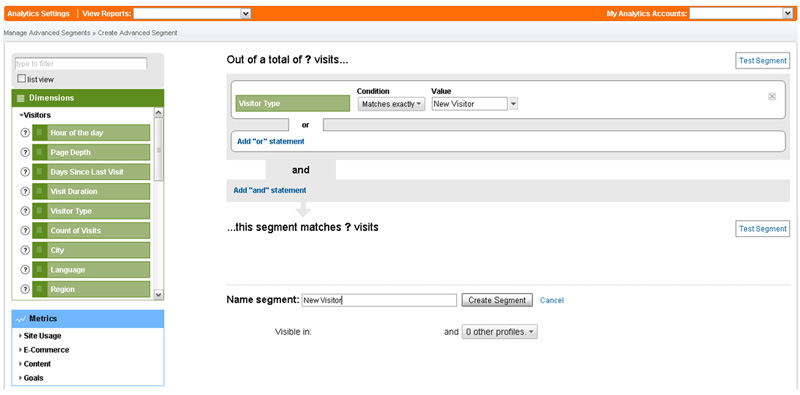
If you are running a web program that lets you segment your visitors, and look at metrics like bounce rate, break up different sources of traffic into new users and returning users. Only then can you really learn from your bounce rates.

Here is a segment created in Google Analytics to look at new visitors and help us splice the data more deeply:
Analytics Settings

Now that you have segmented your visitors, what are they really telling you? I wouldn’t be too concerned if older users are bouncing. As we learned from getting in the mind of the typical return visitor, they likely just want to see your most recent post.

But if new users are bouncing, then you have more cause for alarm. Why aren’t your posts pulling them in to a deeper engagement with your blog? If you’re looking at a homepage, what is missing that would pull them into your site?

On Monday, Part 2 will take a closer look at where your traffic is coming from and where it is landing on your site to help you answer these questions.

Have additional questions? Other metrics you’d like to look at? Use the comments section below or shoot me a tweet me at: @ctrentmarketing

Analytics & Testing, Internet Marketing Strategy